Features & how-to

Everything MyReminders does for you

Never miss a birthday or anniversary again — and when the day comes, have the right words ready, or sent for you.

Features

Free works forever (25 contacts — 50 for early birds who join by 31 Dec 2026). Personal adds Autopilot, unlimited contacts and unlimited scheduled messages.

Autopilot — wishes sent for you

Personal

Turn it on once. Every birthday and anniversary gets a wish at the time you choose, in their time zone — even on the days you forget. You get a notification when they go out.

How to →

Reminders that come to you

Free

A nudge the day before and on the morning of every occasion, plus a Sunday evening summary of the week ahead. Weeks with nothing coming up stay quiet.

How to →
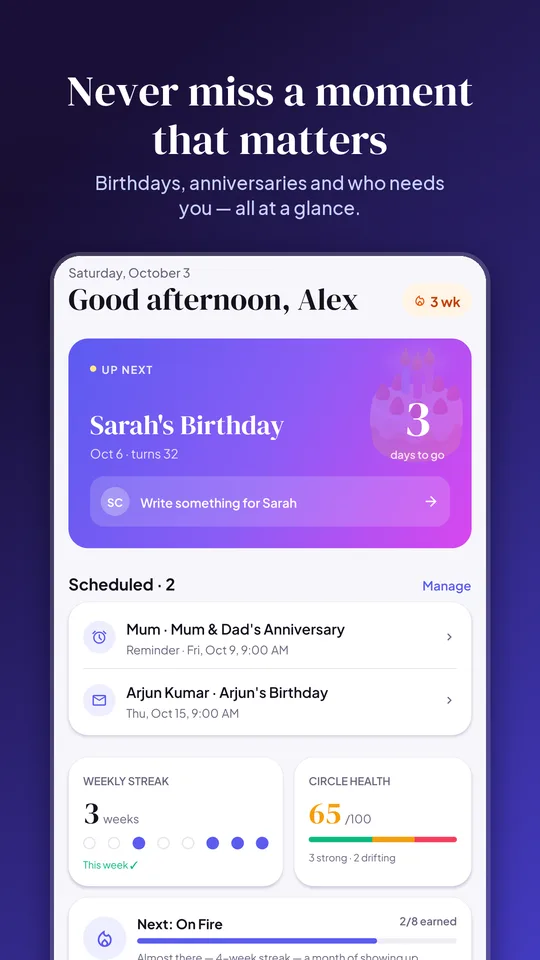
MyReminders app screen: Reminders that come to you

Messages that sound like you

Free

AI drafts from what you know about the person — their dog's name, the job they just started — in the tone and language you pick. Edit it, then send. Unlimited.

How to →
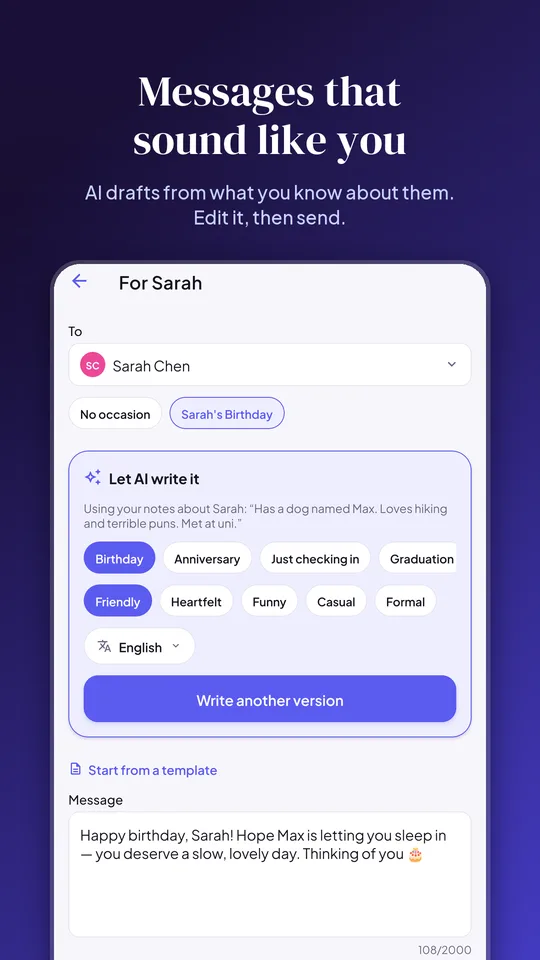
MyReminders app screen: Messages that sound like you

One tap to WhatsApp

Free

Upcoming birthdays have a WhatsApp button: the chat opens with your message already written, so all you do is press send.

How to →

Wish cards with a little celebration

Free

Every wish comes with a link that opens it as an animated card — an envelope, confetti and a ‘Say thanks’ button. Send one to anyone, even people who aren’t in your contacts.

How to →

Set up in minutes

Free

Import your phone contacts with their birthdays, or upload an Excel/CSV list of members, colleagues or clients. You choose exactly who is added.

How to →
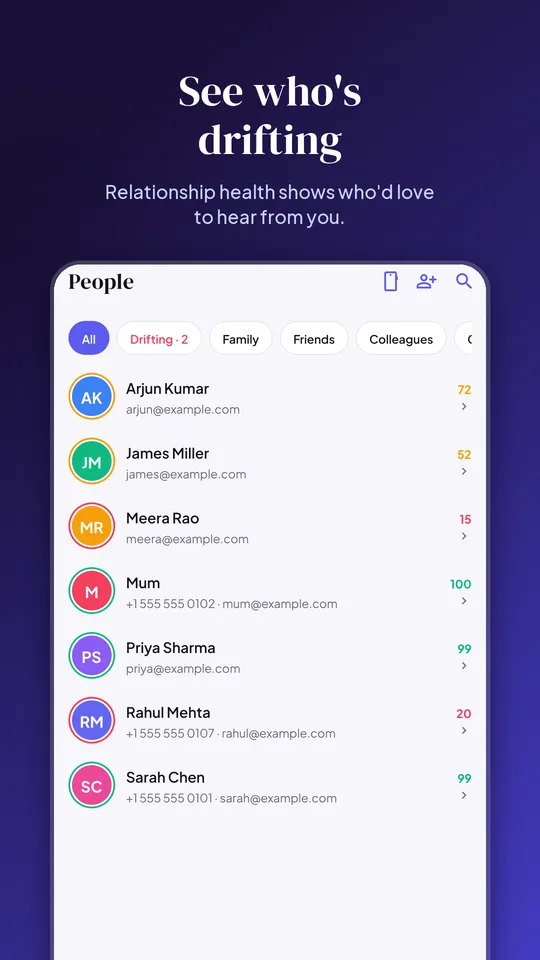
MyReminders app screen: Set up in minutes

Find the dates you forgot

Free

Your photos know when the parties were. MyReminders spots celebration days — cakes, candles, balloons — right on your phone and asks whose day it was.

How to →

Relationship health & streaks

Free

See who you haven’t been in touch with for a while, keep your streak going and earn badges for showing up.
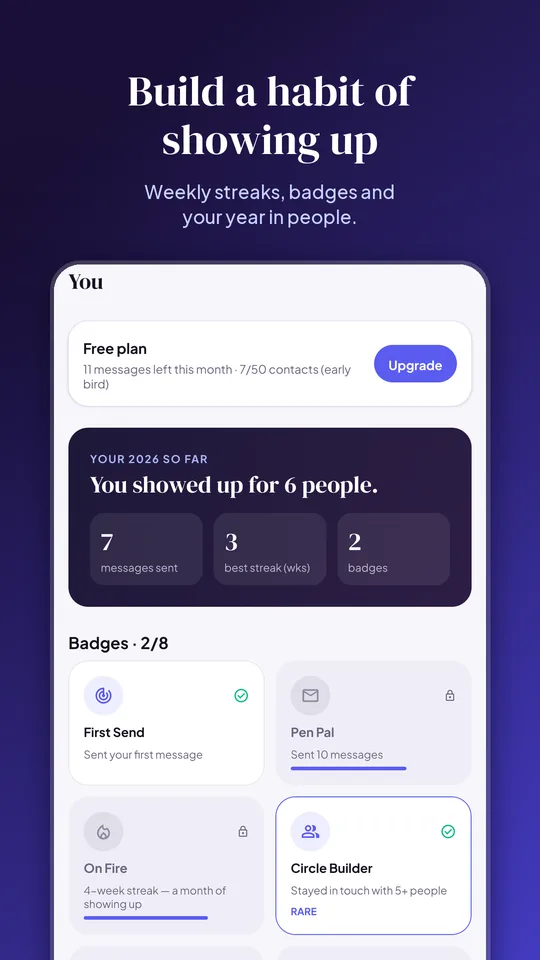
MyReminders app screen: Relationship health & streaks

Your own birthday

Free

Add your birthday and the app opens to your wishes with confetti on the day. Choose to let friends on MyReminders get a reminder the day before.

How to →

Private by design

Free

Names, numbers, emails and notes are encrypted in our database. Contacts and photos are read on your phone; only the people you pick are saved.

How-to guides

Short steps for the iPhone and Android apps. The web app at app.myreminders.world works the same way.

Import your contacts with their birthdays
  1. In the app, open People and tap Import from phone.
  2. Read the short privacy note, then allow access to Contacts.
  3. Tick the people you want — those with birthdays are shown first — and tap Import.
  4. Birthdays and anniversaries saved on your phone come across automatically. Add any missing ones under Moments.
Import a list from Excel (members, team, clients)
  1. On a computer, sign in at app.myreminders.world and go to Settings → Import a list.
  2. Upload your .xlsx or .csv file. Columns like Name, Mobile, Email, Date of birth and Anniversary are recognised automatically — in any order and most date formats.
  3. Check the column choices and the date order (day/month or month/day), and pick the country for numbers without a country code.
  4. Review any rows that need attention, then tap Import. Importing the same file again skips people already saved.
Write a message and send it
  1. On Today, tap an upcoming occasion (or open a person under People).
  2. Tap Let AI write it, choose the occasion, tone and language — or start from a template. Edit the text however you like.
  3. Send it now with WhatsApp or Text from your own phone, or schedule it to go out by email at a time you choose — 9 AM their time is a good default.
Turn on Autopilot
  1. In the app go to You → Autopilot (on the web: Settings → Autopilot).
  2. Choose birthdays and/or anniversaries, the time to send, and how the message is signed.
  3. Edit the message if you like — {first_name} is replaced with each person’s name — and check the preview.
  4. Switch it on and tap Save. Wishes are scheduled two days ahead; you can see or cancel them under Messages.
Send a wish to anyone
  1. On Today, tap Send a wish to anyone.
  2. Enter their name, pick the occasion and write the message (or let AI draft it).
  3. Send it on WhatsApp or share it any other way. They get a link that opens your wish as a card — and can say thanks.
Find dates in your photos
  1. Go to You → Discover dates from photos.
  2. On iPhone, allow access to your photos (Full Access finds the most). On Android, pick photos — press and hold one, then drag to select many at once.
  3. For each day we suggest, choose whose birthday or anniversary it was — or dismiss it. Everything is analysed on your phone; nothing is uploaded.
Set your name and birthday
  1. Go to You → Your name — it’s shown on the wishes and thank-you notes you send.
  2. Go to You → Add your birthday. Keep your birth year private if you like.
  3. Turn on Remind my friends if you’d like people who have you in MyReminders to get a reminder the day before.
Get reminders on your phone
  1. When the app asks, tap Allow for notifications.
  2. If you skipped it: open your phone’s Settings → Notifications → MyReminders and turn notifications on.
  3. Reminders can be switched off any time under You.
Manage or cancel your subscription
  1. Subscriptions bought in the iPhone app: iPhone Settings → your name → Subscriptions → MyReminders.
  2. Bought in the Android app: Google Play → profile picture → Payments & subscriptions → Subscriptions.
  3. Free trials: cancel at least 24 hours before the trial ends and you won’t be charged.
  4. New phone? Tap Restore purchases on the Upgrade screen.

Still stuck? See Support or email appsupport@desireinnovations.com.

For unions, teams and businesses

Remembering hundreds of members, employees or clients is a job no one has time for. Upload your list once and Autopilot sends a personal wish on every birthday, signed with your organisation’s name — replies come straight back to you.

  • Excel or CSV import with birthdays and anniversaries — thousands of people in one go
  • Wishes sent at the time you choose, in each person’s time zone
  • A daily summary in your app of who was wished
  • Each wish opens as a celebration card
Talk to us about pricing

Coming soon

  • Automatic WhatsApp delivery for Autopilot and scheduled messages
  • Family plan — shared contacts for up to 5 people
  • Business plan — team seats and a custom sender name

Start free — it takes two minutes

Create your free account